What Does "Lead Sync" Mean? How Real-Time Lead Syncing Works
TL;DR — Key Takeaways:
- Lead sync is the automatic transfer of lead data from where it was captured (like a Facebook form) to where it needs to go (your CRM or follow-up system).
- Real-time lead syncing delivers leads in seconds, not hours or days — and can boost conversion rates by 391% when you respond within one minute.
- The average business takes 47 hours to respond to a new lead. By then, the lead is already cold.
- 38% of online leads never receive any reply from the vendor at all.
- Webhook-based sync is 90% faster than polling and delivers leads in under 500 milliseconds.
- Manual CSV downloads cost you leads, money, and time — and introduce errors that cost $62 each to fix.
- The best lead sync tools use webhooks, not polling, include deduplication logic, and trigger instant automation like auto-responses and task assignments.
Introduction: The Lead That Got Away
You just got a hot lead from Facebook. A real person filled out your form, interested in what you sell. But that lead is sitting in a CSV file on your desktop. By the time you find the file, clean it, and upload it to your CRM, that lead has already moved on.
That's what lead sync fixes.
What is lead sync?In simple terms, it's the automated process of moving lead data from where it was captured — a Facebook Lead Ad, a landing page, a chatbot — to where it needs to go: your CRM, spreadsheet, email platform, or follow-up automation system. No manual exporting. No copy-paste. No waiting.
In this guide, we'll break down the lead sync meaning in plain English, walk through how real time lead syncing works step-by-step, and show you the best ways to sync leads from simple to advanced. Whether you're running Facebook lead sync into your CRM or exploring CRM lead sync options for the first time, this guide will give you everything you need to make an informed decision.
What Is Lead Sync? (The Definition)
Lead synchronization is the automated, continuous transfer of lead data from a source system to a destination system as soon as the lead is captured. It eliminates manual data entry, removes delays, and ensures your sales team can act on fresh leads immediately.
Think of it as a bridge between lead capture and lead follow-up. Without that bridge, leads fall into the gap.
Lead Sync vs. Lead Import: The Critical Difference
| Factor | Lead Sync (Automatic) | Lead Import (Manual) |
|---|---|---|
| How it works | Automatic, event-driven data flow | One-time or scheduled bulk CSV upload |
| Human intervention | None after setup | Required every time |
| Speed | Instant to seconds | Hours to days |
| Error risk | Low (automated validation) | High (0.3–1% error rate per keystroke) |
| Automation triggers | Yes — instant notifications, tasks, auto-responses | No — nothing fires until data is manually entered |
| Best for | Active lead generation | One-time migrations |
A lead import is manual. You export a CSV, format it, clean it, and upload it into your CRM. Nothing happens automatically.
A lead sync is automatic. The moment a lead hits your source system, it flows — cleaned, formatted, and deduplicated — straight into your destination. Triggers fire. Reps get notified. Follow-up begins.
Real-Time vs. Batch vs. Near-Real-Time Sync
Not all lead sync is created equal. Here's how the three approaches compare:
| Factor | Real-Time Sync | Near-Real-Time | Batch Sync |
|---|---|---|---|
| Speed | Instant (milliseconds to seconds) | 5–15 seconds | Minutes to days |
| Trigger | Webhook / event-driven | Short-interval polling | Scheduled (hourly, daily) |
| Best for | Hot inbound leads, SLA-bound workflows | Fast follow-up without full infrastructure | Reporting, database cleanup, large migrations |
| Cost per record | Higher | Medium | Lowest |
| Setup complexity | Moderate (API/webhook config) | Low to moderate | Low (CSV, ETL) |
| System load | Continuous | Periodic | Scheduled bursts |
Real-time sync is the gold standard for lead conversion. When someone submits a Facebook form, you want that lead in your CRM now.
Why Lead Sync Matters: The Speed-to-Lead Connection
Lead sync isn't a technical luxury. It's a revenue-critical system.
Lead value doesn't decline linearly. It crashes exponentially:
| Time Window | Contact Rate | Qualification Rate |
|---|---|---|
| 0–5 minutes | 95%+ | 21% |
| 5–15 minutes | 80% | 12% |
| 15–30 minutes | 60% | 5% |
| 30–60 minutes | 45% | 2% |
| 1–24 hours | 25% | 1% |
| 7+ days | ~10% | ~0.5% |
A lead that is 95% contactable at minute one becomes barely contactable by the next day.
The Data Tells a Brutal Story
Companies that contact leads within one minute see a 391% higher conversion rate than those who wait 30 minutes or more, according to Velocify research analyzing millions of leads. The MIT / InsideSales.com Lead Response Management Study found that responding within 5 minutes makes you 21× more likely to qualify a lead and 100× more likely to make contact vs. waiting 30 minutes. Harvard Business Review's analysis of 15,000 leads showed a 400% decrease in qualification odds when response time slips from 5 minutes to just 10 minutes.
Yet here's the brutal reality:
- The average B2B lead response time is 47 hours — nearly two full days, per Drift / InsideSales.com data.
- Only 3% of businesses respond within 5 minutes, according to an NP Digital survey of 500 marketers.
- 38% of online leads never receive any reply from the vendor at all, per Forbes research cited by Voiso.
- Sub-5-minute responders have a 32% close rate; 24+ hour responders have a 12% close rate, based on an Optifai Pipeline Study of 939 B2B SaaS companies.
If you're manually downloading leads, you're not just slow — you're in the bottom half of performers.
The Facebook 90-Day Lead Deletion Warning
Facebook only stores leads for 90 days. If you're not syncing automatically, and you forget to download your CSV, those leads are gone forever. Not delayed. Not cold. Deleted.
Automatic Facebook lead sync to your CRM isn't just about speed. It's about not losing leads you already paid for.
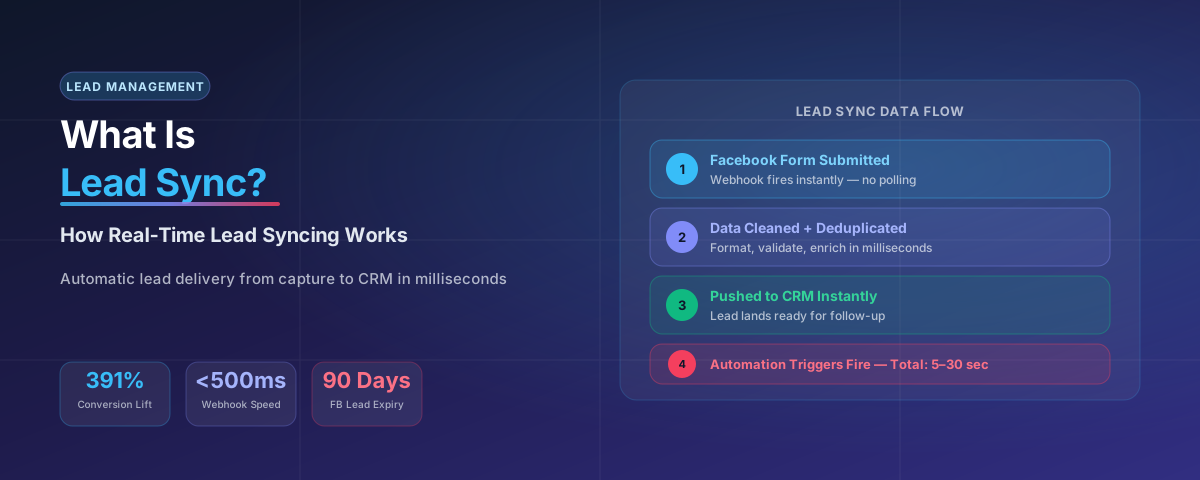
How Real-Time Lead Syncing Works (Step-by-Step)
Real-time lead sync is simpler than it sounds. Here's what happens when a lead is submitted and synced in real time:
- Lead submits the form. A prospect fills out a Facebook Lead Ad, landing page, or chatbot. The clock starts.
- The source system sends a webhook. The platform pushes an instant notification to your integration tool in under 500 milliseconds, according to Reform.app data. No waiting, no polling.
- The sync tool receives the payload. Your platform receives the lead data: name, email, phone, custom answers, source campaign, timestamp.
- Data is transformed. The sync tool cleans and formats it: lowercase emails, standardized phone numbers, split full names, deduplication checks, and enrichment with source data.
- Lead is pushed to your CRM. The cleaned record is sent to your destination system in milliseconds.
- Automation triggers fire. Slack notifications, CRM tasks, auto-response emails or SMS, lead scoring, and even AI voice agents dialing within 15–60 seconds.
- Total time elapsed: 5 to 30 seconds. Best-in-class CRM sync latency is 30 seconds; worst-in-class is 4+ hours, per platform testing across nearly 250,000 sync events.
The Data Flow
Facebook Form → Webhook (instant signal) → Sync Tool (transform + deduplicate) → CRM/Automation (notify + task + auto-respond)
Capture → Signal → Transform → Deliver → Trigger. No humans. No delays. No leads lost in a CSV file.
5 Ways to Sync Leads (From Simple to Advanced)
| Method | Setup Time | Monthly Cost | Sync Latency | Best For |
|---|---|---|---|---|
| Manual CSV Import | 15 min–1 hr | $0 | Days | One-time migrations only |
| Native CRM Integration | 30 min–2 hrs | $0–$30/mo | < 5 seconds | Teams wanting zero code |
| Zapier | 1–3 hrs | $20–$300/mo | 1–15 minutes | SMBs, simple workflows |
| Make.com | 1–3 hrs | $9–$159/mo | Near real-time | Cost-conscious high-volume teams |
| LeadsBridge | 1–2 hrs | $29–$999/mo | Real-time | Ad-heavy marketers |
| Custom API/Webhooks | 1–5 days | Dev cost only | < 1 second | Technical teams, complex logic |
1. Manual CSV Download (Free but Slow and Risky). Export leads from Facebook as a CSV and upload to your CRM. Leads arrive hours or days late. No automation triggers. High error risk (0.3–1% per keystroke). Facebook deletes leads after 90 days.
2. Native CRM Integration (Fast but Limited). Direct built-in connectors (HubSpot, Salesforce, Pipedrive). Sync latency under 5 seconds. Pros: fastest sync, few failure points. Cons: limited to supported platforms, fixed field mapping.
3. Zapier / Make.com (Middle Tier, Reliable). Visual workflow builders that connect apps without code. Zapier: 1–15 minutes, $19–$299/mo. Make.com: near real-time, $9–$159/mo, more cost-efficient at volume. Best for small to mid-size businesses that need flexibility without code.
4. Purpose-Built Platforms (Real-Time, Robust). LeadsBridge offers real-time webhook-based sync with 370+ integrations, audience retargeting, and Conversions API support. Pricing: $29–$1,549/mo. Best for ad-heavy marketers.
5. Custom API / Webhooks (Most Powerful, Developer Needed). Direct server-to-server calls. Sub-second speed, complete control, no per-record fees. Requires developer resources and 1–5 days setup. Best for high-volume teams and regulated industries.
What Happens Without Lead Sync? (The Real Problems)
If you're still manually handling leads — or not handling them at all — here's what you're facing.
1. Data Loss. Facebook stores leads for 90 days. Miss a download cycle and those leads are permanently gone. You paid for the click. You got nothing.
2. Duplicate Leads. Without deduplication logic, your CRM fills with duplicates. The worst platforms create duplicates at a rate of 12.4%; the best keep it to 0.3%. Duplicates inflate your lead count and waste marketing spend.
3. Manual Entry Errors. An AIIM Information Management study found professional data entry operators make errors at a rate of 0.3–1% per keystroke. Sales reps make errors 3–5× higher. Each error costs an average of $62 to detect, correct, and remediate. Automation eliminates 94% of transcription errors within 90 days, according to an Aberdeen Group operations survey.
4. Delayed Follow-Up (Leads Go Cold). The average business takes 47 hours to respond to a lead. By that time, the prospect has moved on. A week-old lead is nearly dead.
5. Broken Attribution. Campaign source data often gets stripped or lost. You can't tell which ad generated which sale. You can't calculate ROI.
6. Team Confusion. When leads live in multiple places — a Facebook CSV, a Google Sheet, a rep's notebook, and half in the CRM — no one knows what's real. Managers can't trust their reports.
Real-Time Lead Syncing Best Practices
If you're setting up or optimizing your lead sync, follow these proven best practices.
1. Use Webhooks, Not Polling. Polling asks your system "Any new leads?" every few minutes. Webhooks push a notification the instant a lead arrives. Webhooks are 90% more efficient and deliver leads in under 500 milliseconds vs. 5–15 minutes for polling.
2. Set Up Data Validation. Configure your sync tool to validate email format, check required fields, standardize formatting, and run deduplication checks before creating new records.
3. Enable Automation Triggers. Set up auto-response emails or SMS, task assignments, lead scoring based on form answers, and SLA alerts if a lead isn't contacted within 5 minutes.
4. Test Your Sync Regularly. Submit a test lead every week. Check that it arrived correctly, triggered the expected automation, and didn't create a duplicate. CRM sync accuracy ranges from 81.4% to 99.2% across platforms.
5. Have a Backup Plan. Configure error alerts when a sync fails, retry logic for temporary failures, and a backup log where all synced leads are recorded.
Lead Syncing Tools: A Quick Comparison
Here's how the most common lead syncing tools stack up:
| Tool | Type | Speed | Cost | Best For |
|---|---|---|---|---|
| Zapier | No-code automation | 1–15 min | $20–$300/mo | SMBs, simple workflows |
| Make.com | No-code automation | Near real-time | $9–$159/mo | Cost-conscious high-volume teams |
| LeadsBridge | Purpose-built lead sync | Real-time | $29–$999/mo | Ad-heavy marketers needing audience sync |
| HubSpot Native | CRM built-in | < 5 sec | CRM tier cost | HubSpot users wanting zero setup |
| Salesforce Native | CRM built-in | < 5 sec | CRM tier cost | Salesforce users wanting zero setup |
| Custom Webhooks | Developer-built | < 1 sec | Dev cost only | Technical teams, complex routing |
| n8n | Open-source automation | Sub-100 ms | $0–$50/mo | Technical teams, self-hosted needs |
Where DripZEN Fits
Most tools above solve one problem: getting leads from point A to point B. DripZEN solves the full pipeline: capture + sync + follow-up automation.
- Capture: Native Facebook Lead Ads integration.
- Sync: Real-time webhook-based delivery to your CRM.
- Follow-up: Instant auto-responses, task assignments, multi-channel nurture sequences, and AI-powered voice follow-up — all triggered the moment the lead arrives.
If you're tired of duct-taping five tools together, DripZEN is the all-in-one platform built for businesses that generate leads from Facebook and need to follow up fast.
Stop Losing Leads to Slow Sync
DripZEN syncs Facebook leads instantly and follows up automatically — so you can focus on closing deals, not moving spreadsheets.
Try DripZEN Free →Conclusion: Don't Let Another Lead Go Cold
What is lead sync?It's the bridge between lead capture and lead follow-up. Without it, your leads sit in CSV files, get lost in inboxes, or simply disappear after 90 days. With it, every lead flows instantly from your ad platform to your CRM, cleaned, formatted, and ready for action.
The data is overwhelming. Responding within one minute boosts conversions by 391%. Per the MIT / InsideSales.com study, 78% of buyers choose the first vendor to respond. Yet the average business takes 47 hours to respond, and 38% of leads never get a reply at all.
If you're manually downloading leads, you're not just slow — you're leaving money on the table.
Real-time lead syncingisn't a technical upgrade — it's a revenue strategy. Set up webhooks, not polling. Validate your data. Deduplicate aggressively. Trigger instant follow-up. And test your system regularly.
Ready to stop losing leads? DripZEN syncs Facebook leads instantly and follows up automatically — so you can focus on closing deals, not moving spreadsheets.
FAQ: Lead Sync
1. What is lead sync?
Lead sync is the automated, continuous transfer of lead data from a source system — like a Facebook Lead Ad, landing page, or chatbot — to a destination system such as your CRM, spreadsheet, or follow-up automation tool, the moment the lead is captured.
2. What is the difference between lead sync and lead import?
Lead sync is automatic and event-driven — leads flow in seconds with no human intervention after setup. Lead import is manual: you export a CSV, clean it, and upload it by hand, which takes hours or days and carries a much higher error rate.
3. What is the difference between real-time and batch sync?
Real-time sync is webhook-driven and delivers leads in milliseconds to seconds. Near-real-time sync uses short-interval polling and delivers in 5 to 15 seconds. Batch sync runs on a schedule — hourly or daily — and can take minutes to days to deliver a lead.
4. Why does Facebook delete leads after 90 days?
Facebook only stores Lead Ad submissions for 90 days as a data retention policy. If you are not syncing automatically and forget to export your CSV in that window, those leads are permanently deleted — not delayed, not archived, gone for good.
5. What tools handle lead sync?
Common options range from native CRM integrations (HubSpot, Salesforce) to no-code tools like Zapier and Make.com, purpose-built platforms like LeadsBridge, and custom API/webhook builds for technical teams. Each trades off setup time, cost, and sync speed differently.
6. Why does lead sync matter for conversion rates?
Lead value decays exponentially. Companies that contact leads within one minute see a 391% higher conversion rate than those waiting 30+ minutes, but the average business takes 47 hours to respond. Lead sync closes that gap by delivering leads instantly instead of leaving them in a CSV file.