
What Is Facebook Lead Ads? Complete Beginner's Guide (2026)
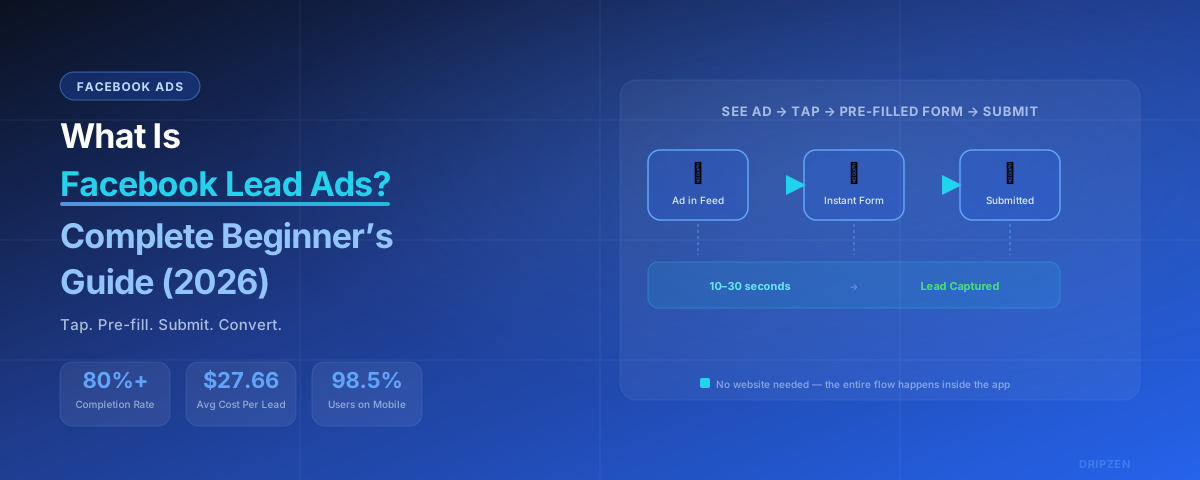
TL;DR — Key Takeaways:
- Facebook Lead Ads (Meta Lead Ads) let people submit contact info inside Facebook or Instagram — no external website needed.
- Pre-filled Instant Forms drive 80%+ completion rates, compared to just 3–5% for traditional landing pages.
- Average cost per lead is around $27.66 across industries (2025 data), typically 30–50% cheaper than landing page leads.
- Facebook deletes lead data after 90 days — connecting to a CRM or automated sync is essential.
- The lead is only the beginning: fast follow-up (within 5 minutes) makes leads up to 9x more likely to convert.
Introduction
Imagine someone scrolling through Facebook on their lunch break. They see your ad offering a free consultation, a quote, or a helpful guide. They tap a button. Instead of waiting for a slow website to load or filling out a long form on a tiny phone screen, their information is already filled in — they just hit "Submit." That's it. Lead captured.
That is the power of Facebook Lead Ads, and it's why they remain one of the most effective lead generation tools in 2026 — a full 11 years after their launch in 2015.
If you're a business owner, marketer, or agency just getting started with paid social, this guide is for you. No jargon. No assumptions. Just a clear, step-by-step walkthrough of what Facebook Lead Ads are, how they work, and how to make them actually produce results for your business.
By the end of this guide, you'll understand what Facebook Lead Ads are in plain English, how they work step by step, how they stack up against traditional landing pages, best practices for setup and conversion, common mistakes to avoid, and how to build a follow-up system that turns leads into revenue.
What Are Facebook Lead Ads? (The Simple Definition)
Facebook Lead Ads are a type of ad format that allows advertisers to collect user information — name, email, phone number, and more — directly inside the Facebook or Instagram app. When a user clicks the ad, a pre-populated form (called an "Instant Form") opens without ever leaving the app. The user reviews their pre-filled info, answers any custom questions you've set up, and submits. The whole process takes seconds.
Here's the key difference: regular ads send people to a website. Lead Ads keep people inside Facebook.
That might sound small, but it's the difference between a 3-second experience and a 15-second experience — and on mobile, those 12 seconds matter. A lot.
When Facebook Lead Ads launched in 2015, they were revolutionary because they solved the single biggest problem with mobile advertising: friction. Most users browse Facebook on their phones (98.5% of Facebook users are on mobile), and asking them to load an external website, zoom in on a form, type with their thumbs, and then submit was a recipe for abandonment.
Lead Ads removed that friction entirely. The form loads instantly. Fields are pre-filled from the user's Facebook profile. No typing required. And because the user never leaves the app, they stay in a trusted, familiar environment.
How Facebook Lead Ads Work (Step-by-Step)
Let's walk through the entire journey — from a user seeing your ad to you receiving their lead data.
User Sees Your Ad
Your ad appears in their feed, Stories, Reels, or Messenger with a call-to-action like "Get Quote."
User Taps the CTA
An optional context card explains what they'll receive and what happens next.
Instant Form Opens — Pre-Filled
The form loads inside the app in under a second, with name, email, and phone already filled in.
Custom Questions (Optional)
2–3 qualifying questions max — each extra field reduces completion by 5–10%.
Review & Submit
User sees your privacy policy link, taps Submit. The whole process takes 10–30 seconds.
Once submitted, the lead data is delivered to you via Meta's Lead Center (downloadable for 90 days only), a direct CRM integration (HubSpot, Salesforce, Zoho, Pipedrive, etc.), email notification or webhook, or a tool like Zapier or LeadSync.
Pro tip: Facebook only stores leads for 90 days. After that, they're deleted permanently. If you're manually downloading leads, that's a hard deadline you can't miss.
Facebook Lead Ads vs. Landing Pages (The Key Differences)
This is the most common question beginners ask: "Should I use Lead Ads or send people to a landing page on my website?"
The honest answer: both have their place. Many successful businesses use a hybrid strategy — Lead Ads for top-of-funnel volume and landing pages for bottom-of-funnel high-intent conversions. But let's compare them head-to-head.
| Factor | Facebook Lead Ads | Traditional Landing Pages |
|---|---|---|
| Form Completion Rate | 80%+ | 3–5% (traditional); 4–8% (optimized) |
| Cost Per Lead (CPL) | $27.66 cross-industry (2025) | Generally 30–50% more expensive |
| Cost Per Appointment | ~$300 | ~$106 |
| Conversion Rate (Click to Lead) | 7.72% average; up to 12.54% in some studies | 2–4% (cold traffic); 4–8% (warm) |
| Lead-to-Appointment Rate | 15–30% | 30–50% |
| Lead Quality | Lower intent; more accidental submissions | Higher intent; demonstrated genuine interest |
| Mobile Experience | Native, seamless, thumb-optimized | Varies; most pages underperform on mobile |
| Page Load Speed | Instant — no external page load | Affects conversion; 40%+ bounce above 3 seconds |
| Pre-Filled Data | Yes — auto-populated from profile | No — manual entry required |
| Setup Speed | Faster — no landing page needed | Slower — requires landing page development |
| Best For | Volume, low-commitment offers, mobile-first | Quality, complex offers, detailed qualification |
The Bottom Line
Lead Ads are cheaper per raw lead and far easier to complete — especially on mobile. But landing pages often produce higher-quality leads that convert to appointments and customers at better rates. One analysis of 3,000+ campaigns found that while Lead Ads produced leads at $6 each versus $18 for landing pages, the "cheaper" Lead Ad leads actually cost 3x more per actual appointment because the conversion rate was so much lower.
Why Facebook Lead Ads Work So Well (The Benefits)
Sky-high completion rates. Lead forms inside Facebook achieve 80%+ completion rates compared to just 3–5% for traditional landing page forms. When a user doesn't have to type anything and the form loads instantly, they submit.
Lower cost per lead. Across industries, Facebook Lead Ads average $27.66 per lead (2025 data) — typically 30–50% cheaper than landing page leads at the raw volume level. Some industries see even better results: education averages just $18 per lead, while home services range from $25–$45.
Built for mobile. 98.5% of Facebook users are on mobile. Lead Ads are native to the app — no pinch-to-zoom, no slow-loading pages, no thumb-typing on tiny keyboards.
No landing page required. You don't need a web developer, a landing page builder, or a designer. You can create and launch a Lead Ad campaign entirely inside Meta Ads Manager.
Faster campaign setup. From idea to live campaign, Lead Ads can be deployed in hours, not days.
Better user experience. Users stay in a trusted environment, their data is pre-filled, and they don't have to create new accounts or remember passwords.
How to Set Up Facebook Lead Ads (Beginner Walkthrough)
Don't worry — you don't need to be a Meta Ads expert. Here's the simplest path to your first Lead Ad campaign.
1. Open Meta Ads Manager
Go to business.facebook.com and navigate to Ads Manager. If you don't have an ad account, you'll need to create one first.
2. Choose "Leads" as Your Objective
Select Leads as your campaign objective. This tells Meta you want to collect contact information.
3. Choose Your Conversion Location
Pick where you want leads to submit: Instant Forms (the classic Lead Ad experience — recommended for beginners), Messenger (automated chat-based capture), Calls (prompt users to call your business), or Website (send to a landing page).
4. Select Your Audience
Define who sees your ad using demographics, interests, behaviors, custom audiences (your existing customer lists, website visitors), and lookalike audiences.
Pro tip: Start with a geo-fenced radius (about 15 miles) rather than a whole city. Studies show this can deliver 40% lower CPL than city-wide targeting.
5. Build Your Ad Creative
Upload your image or video, write a headline and description, and choose a call-to-action button. Design for mobile first (85% of lead ad submissions happen on mobile), use vertical video (9:16) for Reels and Stories, caption everything (85% of Facebook video is watched on mute), and hook viewers in the first 3 seconds.
6. Build Your Lead Form (Keep It Short!)
Choose "More Volume" for maximum leads or "Higher Intent" for better quality. Add pre-filled fields (name, email, phone), 2–3 custom questions maximum, your privacy policy link, a clear context card, and an optimized thank-you screen.
7. Set Your Budget and Schedule
Start with a daily budget of at least $20–$30 per day. For proper testing, budget $1,800–$2,400 over 1–2 months.
8. Publish and Monitor
Launch your campaign and check back daily at first, then weekly. Watch your CPL, CTR (lead campaigns average 2.59%), form completion rate (should be 80%+), and frequency (refresh creative if it climbs above 2.5 on cold audiences).
Best Practices for Facebook Lead Ads (2026)
Keep forms short (3–5 fields max). Every additional field reduces completion by 5–10%. Ask only what you need to qualify and follow up.
Use custom questions strategically. Multiple-choice questions are faster to answer than short-answer. Use conditional logic to branch questions and disqualify poor-fit leads before they even submit.
Follow up fast — speed-to-lead is everything. This is the most important rule that most beginners ignore.
| Follow-Up Time | Contact Rate | Qualification Rate |
|---|---|---|
| Under 5 minutes | 50–60% | 25–35% |
| 5–30 minutes | 30–40% | 15–25% |
| 30–60 minutes | 15–25% | 8–15% |
| Over 1 hour | Under 10% | Under 5% |
Leads contacted within 5 minutes are 9x more likely to convert than those contacted after 30 minutes. Yet the average business takes 47 hours to follow up.
Sync leads to a CRM immediately. Don't manually download CSVs from Ads Manager — it's error-prone, easy to forget, and your data is deleted after 90 days. Connect your Lead Ads directly to your CRM via native integrations, Zapier or webhooks, or third-party tools like LeadSync.
A/B test your creative. Test 3–5 creative variations in weeks 1–2, form variations with the winning creative in weeks 3–4, and audience variations in weeks 5–6. Use a 70/20/10 budget allocation: 70% on proven winners, 20% on iterative variations, 10% on experimental creative.
Always include a privacy policy link. This is required for GDPR, CCPA, and general compliance, and it builds trust.
Set up conversion tracking. Run both the Meta Pixel and Conversions API (CAPI) for cleaner, server-side data that bypasses ad blockers and iOS privacy restrictions.
Common Mistakes Beginners Make
1. Making forms too long. A 10-field form is a lead killer. Stick to 3–5 fields max.
2. Not following up quickly enough. Collecting leads without fast follow-up is like collecting rainwater in a bucket with holes. Contact rates drop from 50–60% to under 10% after just one hour.
3. No CRM sync (manual download only). Manual CSV exports are slow, risky, and forgettable — and Facebook deletes leads after 90 days.
4. Poor targeting. Targeting too broadly wastes budget; targeting too narrowly limits learning. Start with a 15-mile geo radius and layer in demographics and interests.
5. No follow-up sequence. One email isn't enough. Build an automated sequence: instant email confirmation, SMS within 5 minutes, a CRM task for a sales rep within 15 minutes, a sales call within 1 hour, and a follow-up value email on day 2–3.
6. Not testing creative. Running the same ad for months without refreshing leads to ad fatigue. Refresh every 2–3 weeks.
What Happens After Someone Submits? (The Follow-Up)
This is where most businesses drop the ball — and where DripZEN comes in.
Immediately after submission, the lead is available in Meta's Lead Center. You can download it manually as a CSV, but Facebook only stores leads for 90 days. After that, they're gone forever, and manual downloads are slow — by the time you export and import, hours or days may have passed.
Option A: Manual Download (Slow and Risky)
You log into Ads Manager, download a CSV, open it in a spreadsheet, and start calling. The average business takes 47 hours to respond. By then, the lead has forgotten they submitted, moved on, or chosen a competitor who responded faster.
Option B: Automatic CRM Sync (Better)
Connect your Lead Ads to a CRM so leads flow in automatically. This is better, but it's only half the battle — someone still has to call, text, or email, and if it's after hours or your team is busy, that lead sits.
Option C: Automated Follow-Up with DripZEN (Best)
This is where the magic happens. DripZEN is built to solve the exact gap that Lead Ads create: you got the lead, now convert it. With DripZEN, the moment a lead submits your Facebook Lead Ad, your team gets an instant notification, an automated SMS goes out within 60 seconds, an email follow-up triggers immediately, a sales call task is created and assigned, and a multi-touch sequence continues over days and weeks.
You don't have to remember to follow up. You don't have to download CSVs. You don't have to worry about the 90-day deletion limit. The system runs automatically, 24/7.
Because here's the truth: Facebook Lead Ads are excellent at capturing leads, but they're terrible at converting them on their own. The conversion happens in the follow-up. And speed is everything.
Conclusion
So, what is Facebook Lead Ads? They're one of the most powerful, beginner-friendly tools for capturing leads from the world's largest social network. With pre-filled forms, 80%+ completion rates, and mobile-native design, they make lead generation accessible to businesses of any size — even if you don't have a website or a developer on staff.
But remember: the lead is just the starting line. A lead that sits in a dashboard for 47 hours is a lead you've already lost. The businesses that win with Facebook Lead Ads in 2026 aren't the ones with the best creative or the biggest budgets — they're the ones with the fastest follow-up.
If you're ready to turn your Facebook leads into actual revenue, it's time to automate your follow-up. Explore DripZEN and discover how lead capture and automated follow-up can work together to build a lead generation engine that runs while you sleep.
Turn Facebook Lead Ads Into Booked Appointments — On Autopilot
DripZEN connects directly to your Facebook Lead Ads and automatically triggers multi-channel follow-up — SMS, email, and CRM notifications — within seconds of a lead submitting their information.
- Real-time lead sync — no manual CSV exports, no missed leads
- Instant push notifications — follow up before competitors do
- Automated multi-touch sequences — 6–8 touchpoints, fully automated
- Visual pipeline — New → Contacted → Qualified → Won
- Team assignment — clear ownership, zero confusion
- Mobile-first — manage leads from anywhere
Frequently Asked Questions
What is Facebook Lead Ads in simple terms?
Facebook Lead Ads (also called Meta Lead Ads) are ads that let people submit their contact information directly inside Facebook or Instagram using a pre-filled form, without ever leaving the app or visiting an external website.
Are Facebook Lead Ads free to run?
No — Facebook Lead Ads use the same paid advertising system as any other Meta ad. You set a daily or lifetime budget in Ads Manager and pay per impression or per lead, similar to other campaign objectives.
How long does Facebook keep my leads before deleting them?
Facebook only stores lead data in Meta's Lead Center for 90 days. After that, the data is permanently deleted, which is why connecting leads to a CRM or automated export is critical instead of relying on manual downloads.
Are Facebook Lead Ads better than a landing page?
It depends on your goal. Lead Ads have much higher form completion rates (80%+ versus 3-5%) and lower cost per lead, making them great for volume. Landing pages tend to produce higher-intent, higher-quality leads that convert to appointments and customers at better rates.
Do I need a website to run Facebook Lead Ads?
No. One of the biggest advantages of Facebook Lead Ads is that the entire experience — from ad to form submission — happens inside Facebook or Instagram, so you can launch campaigns without a website, landing page, or developer.
What should I do immediately after someone submits a Facebook Lead Ad form?
Sync the lead to a CRM in real time and follow up within 5 minutes if possible. Leads contacted within 5 minutes are up to 9x more likely to convert than those contacted after 30 minutes, so fast, automated follow-up matters more than the ad itself.